October 19, 2026·4 min read
Interaction Design 101 for Physical Digital Experiences


Key Takeaways
- Every interaction has three beats—invite, act, respond—and most bad experiences break one of them.
- Nobody reads instructions for a kiosk: the next step has to be obvious on the first try.
- Answer every action within about a tenth of a second, or people tap again. And again.
- Make mistakes cheap—offer a way back, a clear “home,” and a reset when someone walks away.
- Launch day is day one: a week of watching real people teaches you more than months of analytics.
For the last two decades (how did that happen?!) I’ve designed experiences people interact with—museum touchscreens, digital kiosks, menu boards, exhibits you can pick up and turn over. With Zibit, we put the control to create these experiences in your hands. But how do you create something people want to use?
Digital applications for physical spaces have their own set of considerations and constraints. Here are some tips for getting started with your first digital project to create something people can use successfully.
What is interaction design?
Interaction design is how something shows you what it can do, how you tell it what you want, and how it answers back. Every interaction has the same three beats:
- Invite. The thing shows you what’s possible.
- Act. You do something—tap, press, turn, walk up, pick up.
- Respond. It tells you what happened.
When any beat breaks, people get stuck. A button that doesn’t look pressable skips the invite. A screen that lags skips the response. Most bad experiences I’ve seen fail at one of these three moments—not because the graphics were ugly, but because people get lost in this loop.
Interaction design for physical devices differs a lot from mobile and web design. You can have a huge variety of audiences but not know exactly who is standing in front of your kiosk. The environment dictates usability, too: glare, noise, height, crowds, and where the screen sits all decide whether anyone uses it.
Five principles that hold up everywhere
-
Make the next step obvious. If people need a sign to use it, the design needs work. Think of the door you’re supposed to push that has a handle. The handle says “pull,” so everyone pulls. Nobody reads instructions for a kiosk. It has to work on the first try.
-
Answer every action—fast. An elevator button lights up the moment you press it. The light doesn’t move the elevator, but it tells you you were heard. On a touchscreen, about a tenth of a second is the window where a response feels instant. Miss it and people tap again. And again.
-
Make it forgiving. Always offer a way back and a clear “home.” Let the system reset itself when someone walks away (Zibit handles this for you!). People explore more when mistakes are cheap. If a visitor gets stuck, they walk away. You rarely get them back.
-
Design for the moment people are in. Someone ordering coffee at 7:45 a.m. isn’t browsing. A family at a museum is talking, pointing, and exploring together. Context and situation matters—tailor your design for the situation, environment, and experience.
-
Be consistent. If a swipe goes forward on one screen, it goes forward on every screen. Each new rule people have to learn is a chance to lose them.
A real-life example
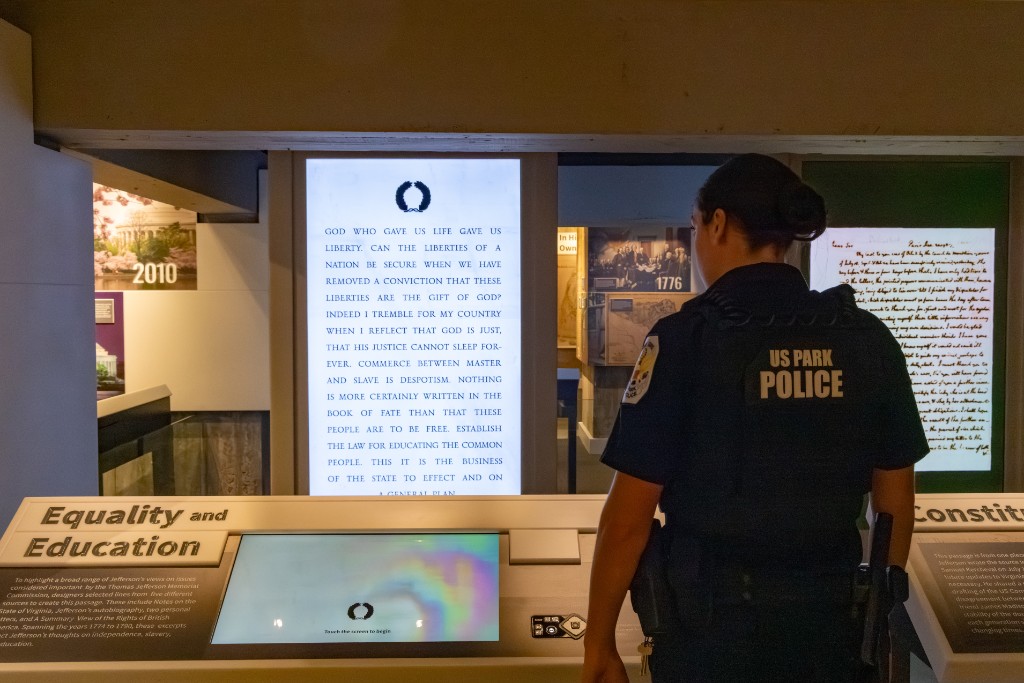
At the Thomas Jefferson Memorial, we worked with The Design Minds and the National Park Service on a museum redesign. Each of the four stations pairs a touchscreen with a large 4K display.
That setup changes the conversation. The touchscreen is where you act. The big screen is where the response shows up—for you and everyone standing behind you. So every choice had to answer questions like:
- When I tap here, do I know to look up there?
- Does the big screen make sense to someone who never touched anything?
- What should it do when nobody’s using it at all?
None of those are visual design questions. They’re interaction questions. And they decide whether a station feels smart or confusing.
Your design is a moving target
Don’t treat launch day as the finish line. It’s really the first day of real testing.
“One week of watching real people teaches you more than months of analytics.”
One week of watching real people teaches you more than months of analytics. Maybe everyone misses the start button. Maybe they all tap the map, which wasn’t meant to do anything. Good interaction design means acting on what you see.
That’s a big reason we built Zibit. You can change content and the experience from a browser, push updates to every screen in a space at once, and use built-in analytics to see how people actually use it. The design gets better because changing it is easy.
Your turn
Pick one interaction in your space that people get wrong every day—the door, the kiosk, the sign by the elevator. Which beat is breaking: the invite, the action, or the response?
Quick answers
What is interaction design?
Interaction design is how something shows you what it can do, how you tell it what you want, and how it answers back. Every interaction has three beats—invite, act, respond—and when any beat breaks, people get stuck.
How fast should a touchscreen respond to a tap?
About a tenth of a second is the window where a response feels instant. Miss it and people tap again—and again.
How is designing for kiosks different from web or mobile design?
You don't know exactly who is standing in front of the screen, and the environment dictates usability: glare, noise, height, crowds, and where the screen sits all decide whether anyone uses it.
What should you do after a digital experience launches?
Treat launch day as the first day of real testing. One week of watching real people teaches you more than months of analytics—good interaction design means acting on what you see.